

I still remember the pain of my old 3GB RAM smartphone. I was pushing for Heroic on Bermuda, hiding inside a house at Clock Tower. A full squad rushed me. I pulled out my M1887, tried to place a Gloo Wall, and… my screen completely froze. Two seconds later, my screen unfroze, and I was staring at a loot box. My loot box.
If you are reading this, you know exactly what I am talking about. There is nothing worse than losing rank points because your phone couldn’t handle the game.
Many players think they need to buy an expensive gaming phone to get Booyahs. That is a myth. You just need to optimize the phone you already hold in your hands. Today, I am going to show you exactly how to fix free fire lag on android. No fake ping apps, no scammy game boosters. Just raw, technical settings that actually work.
The Gun Skin Evolution: Why Phones Lag Today
Before we jump into the fixes, we have to talk about why your phone lags in 2026 when it used to run the game perfectly fine a few years ago. The answer? Gun Skins and Costumes.
Let’s look at the history of Garena Free Fire gun skins. The very first gun skin in the game was the simple Red M4A1. Its features and abilities were basic—it just gave a tiny rate of fire boost. Why did it become popular? Because it was the first time we could customize our weapons! But visually, it was just a flat, red texture file. It took zero RAM to load.
Fast forward to the evolution of gun skins today. Now we have Evolutionary (Evo) weapons like the Blue Flame Draco AK. These aren’t just textures; they have massive 3D dragon wings, glowing particle effects, and custom kill animations. When you drop into a lobby and 50 players load in with glowing Evo skins and animated bundles, your Android processor screams for mercy. The game engine has become too heavy.

Step 1: The “Smooth + High FPS” Trick
The biggest mistake I see beginners make is putting their graphics on “Ultra” just because they want the game to look like a movie. If you are on a budget Android, Ultra graphics will cause your phone to overheat in 5 minutes, leading to severe thermal throttling (lag).
Open your Free Fire settings and go to the Display tab. Do this right now:
- Graphics: Set to Smooth. This turns off heavy shadows and water reflections.
- High Res: Set to Normal.
- High FPS: Set to HIGH.
This is the secret sauce for learning how to fix free fire lag on android. You want the graphics to be as ugly as possible, but the Frame Rate (FPS) to be as high as possible. High FPS makes your drag headshots register instantly without screen stuttering.
Step 2: Purge the Download Center
Remember what I said about Evo skins causing lag? You can actually stop your phone from downloading them.
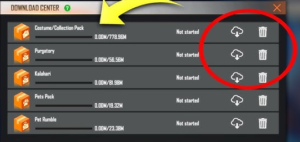
Click the little cloud icon at the top of your Free Fire lobby. This is the Expansion Pack center. If you have “Download All” checked, you are actively destroying your phone’s performance. Your phone storage is probably full of maps you never play and clothes you never wear.
Hit the trash can icon and delete the Costume Collection Pack. By deleting this, every enemy in your match will look like the default Adam or Eve character. Your processor won’t have to render their heavy, glowing outfits. This single trick reduces house-rush frame drops by almost 50%.
Step 3: Android Developer Options (Advanced)
If the in-game settings didn’t fix the stuttering, we have to go into the brain of your Android phone.
When you play Free Fire, apps like Instagram, WhatsApp, and Chrome are secretly running in the background, eating up your RAM. We need to kill them.
- Go to your phone Settings > About Phone.
- Tap “Build Number” 7 times rapidly to unlock Developer Options.
- Go back to settings, search for Developer Options, and open it.
- Scroll way down to the Apps section and find Background Process Limit.
- Change it from Standard Limit to “At most 1 process”.
This forces your phone to dedicate almost 100% of its memory directly to Free Fire. Just remember to turn it back to standard when you finish your gaming session!
Step 4: Physical Heat Management
Your phone’s CPU automatically slows itself down when it gets too hot. This is called thermal throttling. If your phone feels hot to the touch, you will experience lag spikes.
Never play Free Fire while your phone is plugged into the charger. Charging generates massive heat. Also, take your thick rubber phone case off while playing Ranked matches. Let the glass or metal back of your phone breathe so the heat can escape.
Key Takeaways
- The evolution of heavy, animated gun skins is a major cause of modern Free Fire lag.
- Always play on “Smooth” graphics but keep “High FPS” enabled for better headshot registry.
- Delete the Costume Collection pack in the Download Center to stop rendering enemy outfits.
- Use Developer Options to limit background apps and free up your Android’s RAM.
- Remove your phone case and never play while charging to prevent thermal throttling.
You don’t need to be rich to play like a pro. Figuring out how to fix free fire lag on android is just about being smart with your device’s resources. Strip away the heavy graphics, clear out the useless expansion packs, and keep your phone cool. Try these settings today, head into the Training Grounds, and feel how smooth your Gloo Wall placements become.
Got a specific phone model that keeps freezing? Drop a comment below, and I’ll try to help you figure out a custom fix!
Frequently Asked Questions (FAQs)
Do game booster apps actually reduce lag in Free Fire?
Honestly, most third-party game boosters on the Play Store just clear your cache and run ads, which actually uses more RAM. It is always better to use the built-in “Game Mode” or “Game Turbo” that comes factory-installed on your specific Android device.
Will clearing Free Fire data delete my account?
Clearing the “Cache” is perfectly safe and helps reduce lag. However, clicking “Clear Data” will delete your custom HUD settings and require you to log back into your Facebook or Google account. Always bind your account before clearing data!
Why does my ping spike when my game lags?
Sometimes frame lag and network lag happen at the same time. If your phone’s processor is choking, it struggles to process the Wi-Fi packets being sent from the Garena server. Fixing the graphical lag often stabilizes the ping spikes as well.
Quick Answer: Fixing the Lag
To know exactly how to fix free fire lag on android, you must change your in-game graphics to ‘Smooth’ while turning ‘High FPS’ to ‘On’. Next, open the Free Fire Download Center and delete all unused Expansion Packs and Costume Collections. Finally, go to your phone’s Developer Options and set the ‘Background Process Limit’ to 1 to free up maximum RAM.